Posts

Showing posts with the label Power BI

Connecting to OData Feeds with Excel 2013
Image
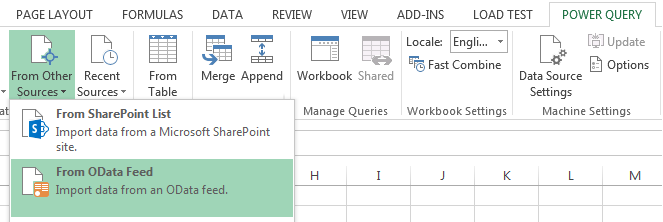
OData feeds, is connecting to data sources that supports Open Data Protocol, which is a data access protocol initially defined by Microsoft, it is similar to JDBC and ODBC although OData is not limited to SQL databases, the protocol was designed to provide standard CRUD access to a data source via a website. OData is the protocol is the data API for Microsoft Azure. Also one of the most popular OData client implementations are Microsoft SharePoint 2010, 2013 and WCF Data Services. There are two main ways to connect to OData feeds with Excel, which I'm going to address in this post.  Say we are to connect to a SharePoint list called resources: Connecting with Power Query Open Excel and under POWER QUERY ribbon tab, click From Other Sources > From OData Feed. In the OData Feed dialog box, enter the URL for an OData feed then click OK.  Note:  When connecting to SharePoint lists, usually your URL would be in the following format htt...

Step by Step: Power BI Q&A in Office 365

Image
While I was exploring the awesomeness of Power BI in Excel 2013 and Office 365, I came across this amazing feature of Power BI  Q&A . Simply, Q&A is a way to interact with your data, to filter, sort, aggregate, group and display data using natural language! Yea, you read that correctly, natural language!  I was really blown away by this smart yet indeed useful feature. Well, in this post I'll lay down how to utilize this amazing feature, step by step. Prerequisites First of all, Power BI features associated with SharePoint are only available with Office 365 (cloud only, not available on-prem). In order to get Power BI capabilities (app) with Office 365, you need to register for Power BI for Office 365 . You need to have Excel 2013 Professional Plus installed on your local machine. Finally, you need to start PowerPivot add-in Excel 2013 . Collect and Model Your Data There are various ...