Posts

Showing posts with the label SharePoint

Counting Down to ESPC21 Online

Image
This May 28 th , I will be delivering a full day tutorial with Serge Luca on Building Solutions with Power Apps & Power Automate . But that’s not all! On June 2nd, I will be delivering a session: Business RPA with Power Automate . Learn about what is RPA, its business benefits and how you can fit Power Automate Desktop to transform business processes in your organization, freeing your from repetitive tasks.   I will be taking any questions you may have live during my session, so come prepared!      ESPC21 is always amazing, whether in-person or virtual – the best speakers, topics and audience and everyone is so engaged, so I am really excited to be speaking at this event.  Register today to be sure you don’t miss it!   As a speaker at  ESPC21 Online  I can share with you a special 25% discount on Pro Access tickets, which includes a pre-event tutorial of your choice, all event sessions on demand and more....

Building JSON Objects in Microsoft Flow

Image
A couple of days ago, I was helping a friend with a case in Microsoft Flow ... So I thought this is a good time to write a new article that would be a reference for my friend, and hopefully others would find this useful if they came across the same issue. The Case It's very simple and straight forward, we have a flow that gets initiated once an item is added to a SharePoint list, and we want to return a JSON object of the newly added item ... Easy! Good to know... Now before going into the solution, it's good to know that Microsoft Flow itself handles data within as JSON, whereas Flow is not only a process automation service, it's an integration service as well. Therefore it needs a common ground/language/format - you name it - to handle all data types from all the different sources (SharePoint list, SQL Table, Excel, etc...) This is How... Well, there are two different ways to tackle the case above, and I'm going to list them both in this article....

I'm Speaking at The Czech SharePoint Conference 2017

Image
… there was a time, when SharePoint like a topic has usually one session inside bigger technical events or was not part of some events at all and we want a change. So, we created an event! The Czech SharePoint Conference Once again, I'm headed to the Czech Republic, but this time around to its beating heart city of Prague, whereas I'll be part of the Czech SharePoint conference 2017 ! The Czech SharePoint Conference 2017 will be held between 6th - 8th November in Prague at Microsoft HQ, Vyskočilova Praha 4 ... A couple of the famous and well-known local speakers will be speaking there, in addition to the well-known world travelers Micheal Noel and Joel Oleson! I'm so humbled and honored to be among them ... For the Czech SharePoint Conference 2017 I have prepared a session and a workshop. On Monday, November 6th I'll kick off with a session on  Modern Business Applications: Microsoft flow, PowerApps & latest News from Ignite :  Microsoft is investing eno...

I'm Speaking at SharePoint Saturday Cambridge 2017

Image
I’m so excited to be part of my 6th SharePoint Saturday event this year! Once again I’m flying to England but this time to another city; and to be more specific I’m headed to the prestigious city of Cambridge! SharePoint Saturday Cambridge will be held at Møller Centre at Churchill College in Cambridge, and as per the event organizers, and I quote “This time it is WAR!” SPS Cambridge will be joining with a sister event (SQLSaturday Cambridge) whereas event speakers and attendees this time will do battle with one another to show *who* is the boss -so expect lots of fun and games throughout the day to mark our special Civil War Edition. SOUNDS FUN! As I did in SPS Toronto, and as part of my tech channel “The 365-Tech Talk” I’ll be doing interviews with my fellow speakers at SPS Cambridge  … For SPS Cambridge, I’ll be holding a session on PowerApps & Microsoft Flow: Advanced Scenarios which will give a deep dive on PowerApps and Flow for building and using custom busines...

I'm Speaking at SharePoint Saturday Toronto 2017

Image
Community contribution doesn’t know any limits! And this time around my contribution passion drove me to another continent and specifically to Canada-Toronto, whereas I’ll be part of one of the biggest community events in north America generally and Canada particularly. SharePoint Saturday Toronto is known for its awesome reputation, not to mention it was one of the first events to host Jeff Teper – Office, SharePoint and OneDrive corporate vice president at Microsoft – or for short “The father of SharePoint”.  As per SPS Toronto organizers, a huge crowd is expected to show up at this year's event, which is a good opportunity to meet with more people from the community and hear their stories.  For SPS Toronto I have prepared two things, a session and a surprise ! I’ll start with the latter mystery, which is something I’m going to announce/launch during this week before SPS Toronto, whereas it’s going to be a pleasant surprise for the community in general and for th...

I'm Speaking at SharePoint Saturday Dubai 2017

Image
Once again, I'm ready to be part of another SharePoint Saturday! This time, I'll be speaking at the 6th SharePoint Saturday in the UAE (United Arab Emirates) in the city of Dubai on 15th July. I'll be meeting with some usual faces from SPS Warsaw 2017, but also looking forward to meet new faces and hear their SharePoint stories... For SPS Dubai, I'll be throwing a session on  PowerApps & Microsoft Flow: Advanced Scenarios which will give a deep dive on PowerApps and Flow for building and using custom business apps that connect to your data and work across the web and mobile. An I'll also shed some light on the scenarios where the need to customize and develop extra features for workflows, in order to take workflows to the next level. This session demonstrates key advanced scenarios addressing the next level workflows using PowerApps and Flow, featuring Azure API Apps and Azure Functions. As usual, my session brand is fun slides and demos, demos, demo...

I'm Speaking at SharePoint Saturday London 2017

Image
I'm honored and humbled to be speaking at the 3rd SharePoint Saturday in London on 24th June. SPS London is known to be one of the most famous and elegant SPSs around Europe! This year around, Chris McNulty, Senior Product Manager (and by definition SON of the Father of SharePoint 😁) at Microsoft will be throwing a closing keynote discussing the Future of SharePoint building based on the announcements made at the virtual SharePoint Summit in May. This year's SPS London is bigger than ever, 43 speakers - including myself - will be participating in this year's geek out, delivering various sessions touching on subjects like bots, IoT, webhooks, SharePoint Framework, Microsoft Teams, and - of course - PowerApps and Microsoft Flow, which I'll be speaking about in my session. I'll be delivering a session on  Building Applications with Power Apps, Microsoft Flow and Office 365 which illustrates the use of PowerApps and Flow for building and using custom busin...

I'm Speaking at SharePoint Saturday Brno 2017

Image
I'll be speaking at the very first SharePoint Saturday in the Czech republic in the city of Brno on 10th June. What is most exciting about this is not only being part of the very first SPS in Brno, but also doing two sessions! My first observation is, unlike any other SPS event I've been to, SPS Brno 2017 speakers gets to speak for 1 hour and 15 minutes, which gives enough room for alotta fun and loads of demos, which in turn will turn sessions into a firehose of information! For SPS Brno, these are the two sessions I'll be doing: Go with the Microsoft Flow which will be an introduction on Microsoft Flow and how it can help you save time, and make your business highly visible by partnering with Microsoft's growing ecosystem including O365 and SharePoint Online. I'll demonstrate how you can create an automated workflow between your favorite O365 apps and services to get notifications, synchronize files, collect data, and more! PowerApps & Microsoft F...

Toggling Between Content Types in SharePoint 2010

Image
Introduction In this post we are going to go through how to toggle between different content types in a list, after firing the Add and/or Edit form. Now, we all know that we can do that from the ribbon on the top of the page (before firing the add form) like so: However, I came across a customer requirement, which requested to be able to toggle between content types after firing the add form, which we'll address in this post. Scenario Company ABC , requests to have a list called Employees , which contains two content types: Employee Manager Now, for the sake of simplicity,the Manager content type differs by one extra site column from the Employee content type. I have assumed that a manager gets a parking space in the company's building (Perfect!) Content types looks as follows: Employee Manager First Name ...

Connecting to OData Feeds with Excel 2013

Image
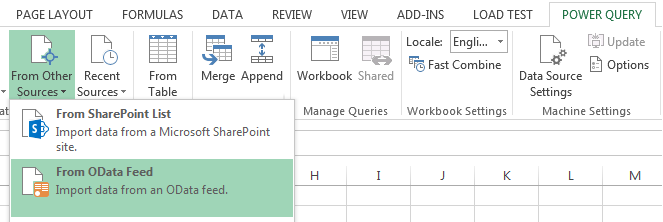
OData feeds, is connecting to data sources that supports Open Data Protocol, which is a data access protocol initially defined by Microsoft, it is similar to JDBC and ODBC although OData is not limited to SQL databases, the protocol was designed to provide standard CRUD access to a data source via a website. OData is the protocol is the data API for Microsoft Azure. Also one of the most popular OData client implementations are Microsoft SharePoint 2010, 2013 and WCF Data Services. There are two main ways to connect to OData feeds with Excel, which I'm going to address in this post.  Say we are to connect to a SharePoint list called resources: Connecting with Power Query Open Excel and under POWER QUERY ribbon tab, click From Other Sources > From OData Feed. In the OData Feed dialog box, enter the URL for an OData feed then click OK.  Note:  When connecting to SharePoint lists, usually your URL would be in the following format htt...

Step by Step: Power BI Q&A in Office 365

Image
While I was exploring the awesomeness of Power BI in Excel 2013 and Office 365, I came across this amazing feature of Power BI  Q&A . Simply, Q&A is a way to interact with your data, to filter, sort, aggregate, group and display data using natural language! Yea, you read that correctly, natural language!  I was really blown away by this smart yet indeed useful feature. Well, in this post I'll lay down how to utilize this amazing feature, step by step. Prerequisites First of all, Power BI features associated with SharePoint are only available with Office 365 (cloud only, not available on-prem). In order to get Power BI capabilities (app) with Office 365, you need to register for Power BI for Office 365 . You need to have Excel 2013 Professional Plus installed on your local machine. Finally, you need to start PowerPivot add-in Excel 2013 . Collect and Model Your Data There are various ...